There are recent changes from Brock University regarding the use of AI. Please learn more about AI Guidelines here.
Clubs Newsletter
The Clubs Newsletter is sent out once a month at the beginning of the month. The newsletter is used to educate club leaders on:
- Updates within the BUSU Clubs department
- Opportunities available to club leaders
- Promotion of BUSU and Brock events
Click here to sign up for the Clubs Newsletter!
Club Promotional Video
Increase your club's visibility and reach more Brock students by featuring your club on the @BrockBUSU and @BrockTV social media channels.
Each ratified club is eligible to request one promotional video opportunity per academic year. These videos are designed to introduce students to your club, highlight your club's mission and purpose, and encourage new members to get involved.
Promotional videos are intended to showcase your club as a whole rather than advertise a specific event.
Option 1: Clubs with Cam (BrockTV)
Join the Clubs with Cam series, where the BrockTV production team attends one of your club meetings, activities, or outings to experience what your club is all about.
This would be a full production BrockTV video shared on @BrockTV, @BrockBUSU, and your club's Instagram account.
This option is ideal for clubs looking to showcase their purpose and overall member experience, with the primary goal of promoting the club rather than a specific event.
Option 2 - Post on @BrockBUSU Instagram page
Create your own short promotional video introducing your club to the Brock community.
BUSU will publish your video on the @BrockBUSU Instagram account, include a promotional caption, and collaborate with your club's Instagram account to maximize reach and engagement.
This option is ideal for clubs that want creative control over their promotional content while benefiting from BUSU's audience.
Request a Promotional Video
Please visit the Video Requests page on the BrockTV website to submit your promotional video request.
Please note that availability is limited and requests are accommodated based on production scheduling.
Design & Printing
BUSU Club Branding 101
When you become a part of a BUSU club, you are not only representing clubs, but the BUSU student community. Following BUSU’s branding guidelines is important because it helps students immediately recognize that a club is an official BUSU organization.
BUSU’s logo and colours build consistency. Altering BUSU’s branding can create confusion between official BUSU clubs and unrelated organizations. Professional and consistent branding communicates that the club is organized, credible, and connected to the university community. It also makes it easier for clubs to collaborate with BUSU and one another.
Sticking to BUSU Club brand guidelines helps clubs maintain a recognizable, professional presence, while still allowing each club to showcase their own identity.
Branding Do’s
- Maintain the integrity of the BUSU logo. Additional approved colour variations are full white or full black when the official logo is not suitable.
- Give the logo adequate space and keep it visible without crowding surrounding elements.
- Use the BUSU logo on official club communications, including posters and social media, when appropriate.
Branding Don'ts
- Do not alter or recreate the BUSU logo.
- Do not alter BUSU colours.
- Do not stretch or distort the logo.
- Do not place the logo inside a box, circle, or any other shape, as this alters the logo.
- Keep logo proportions intact; do not crop or remove logo elements.
- Do not combine your club logo with the BUSU logo.
- Do not use the BUSU logo for personal or unrelated purposes.
Design Templates Available for Club Marketing Materials
How to Use Canva to Design Your Club Marketing Materials
Whether you're creating a banner, Spin the Wheel inserts, or stickers, Canva is a user-friendly design platform that allows your club to customize templates easily and professionally. Follow the steps below to get started with your designs.
- Step 1: Access the Provided Template Link
- Navigate to the marketing tool you’re designing (e.g., banner, Spin the Wheel insert, or sticker) and click the provided Canva template link to open the pre-sized design file for that item.
- Step 2: Create or Log Into Your Canva Account
- Once you've opened the template link, click “Use template for new design.” You’ll be prompted to log in—if you already have a Canva account, simply sign in. If you're new to Canva, click “Sign up” and create an account using your club’s Google login or any club-associated email address.
- Step 3: Customize the Template
- Click the “Uploads” tab on the left-hand panel to upload your club’s logos, images, or custom graphics.
- Drag and drop your uploads into the appropriate placeholders in the template.
- Use Canva’s built-in features to adjust text, colors, backgrounds, and layout as needed.
- Step 4: Download and Save Your Final Design
- Once your design is complete, click the “Share” button in the top-right corner.
- Select “Download”, choose PDF Print as the file format for high-quality output, and save the file to your device.
Banners
Each club is entitled to one printed banner as part of their initial ratification. Banners are a great way to increase visibility during events, tabling, and promotional activities throughout the year.
If your club needs assistance with creating a banner, please submit a design request with the Banner Design Request Form. Please plan in advance and allow 10 - 15 business days for design creation.
If you already have a finalized, print-ready design, please submit your design file through the Banner Printing Request Form to begin the printing process.
Banner designs must follow one of the two approved size options: 62 x 30 inches in landscape orientation or 30 x 62 inches in portrait orientation.
Once your banner is printed (typically within 2 weeks), the Clubs Administrator will contact your club for pick-up at the BUSU front desk.
Clubs may purchase additional or replacement banners at their own expense for $62 plus taxes.
Posters
All clubs are entitled to 250 free poster prints per academic year. Posters are a simple yet effective way to connect with the campus community and build your club’s presence!
If your club needs help designing an eye-catching poster, please submit a request through the Poster Design Request Form. Please allow up to 10 - 15 business days for design creation.
Once your design is finalized and ready to print—or if you already have a poster prepared—you can submit it through the Poster Printing Request Form.
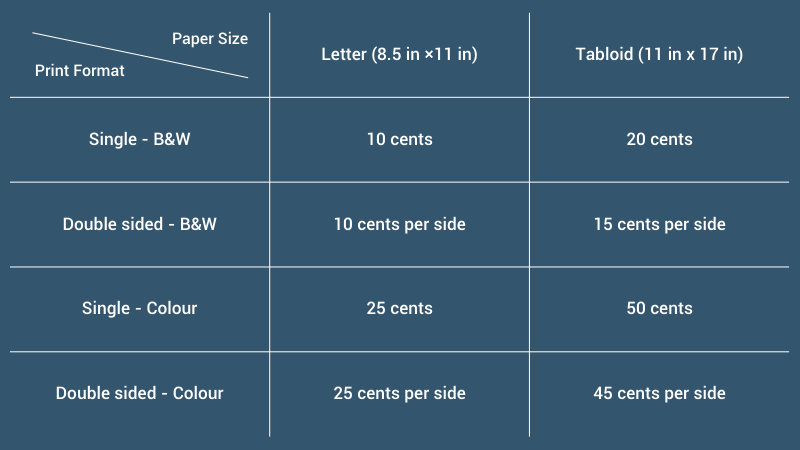
Posters can be printed in either 8.5 x 11 inches (letter size) or 11 x 17 inches (tabloid size).
Please allow 3–5 business days for processing and printing. You will be notified by the Clubs Coordinator when your posters are ready for pickup at the Club House (TH 252A), located beside Soctiabank.
Campus Promotions Procedures and Approval Process
Submit your poster details through the Campus Promotions Submission Form at least 5 business days before posting.
Once your materials are reviewed, you’ll receive an email confirmation, and you may then post your posters in the designated Campus Promotions Poster Areas during the provided posting window.
Bonus: You can now submit your digital file before printing, saving you time and ensuring that you can post your materials as soon as they are ready!
You can find the full Campus Promotions guidelines on the Campus Promotions Webpage.
Additional Poster Printing Costs
Stickers
Stickers are a great way to promote your club and create fun giveaways for events or tabling.
Each ratified club may request up to five sheets of stickers per academic year (60 stickers in total) free of charge.
Additional sheets are available at a cost of $2.50 per sheet (12 stickers per sheet), covered by the club.
If your club needs help designing your stickers, please fill out the Sticker Design Request Form. Clubs may request for a maximum of four different sticker designs per academic year. Please allow up to 10 - 15 business days for design creation.
Please ensure all sticker design files meet the required size and formatting guidelines. Each sticker should be designed as an individual 2" circle, preferably with a transparent background.
Once your designs are finalized, or if you already have completed sticker designs ready, please submit them through the Sticker Printing Request Form to begin the printing process.
Sticker printing requires 3 to 5 business days, so please plan accordingly. The Clubs Coordinator will notify your club by email once printing is complete and ready for pick up from the Club House (TH 252A, beside Scotiabank).
Spin The Wheel Insert Template
Clubs can reserve the Spin the Wheel free of charge to boost engagement during events, tabling, and promotional activities. It’s a fun and interactive way to draw attention, increase engagement, and connect with students.
To reserve the Spin the Wheel, clubs must submit the Clubs Resources Inventory Rental Request Form at least five business days in advance to allow for processing and confirmation.
If your club would like to personalize the inserts for the wheel, custom designs can be submitted for printing using the Spin the Wheel Insert Printing Request Form. Insert designs must follow the provided template to ensure correct sizing and layout.
Once your request is submitted, please allow 3 to 5 business days for processing and printing.You will be notified by the Clubs Coordinator when your inserts are ready for pickup at the Club House (TH 252A), located beside Scotiabank.
Logos
Every club needs a strong and recognizable logo to stand out and make a lasting impression on the Brock community.
If your club needs a logo or would like to refresh an existing one, you may submit a Logo Design Request for support. The Clubs Administrator is available to assist with the creative process!
Once submitted, you'll receive an initial draft for review, with one round of revisions available before final approval.
Who to Contact
Need help with marketing requests? Email clubsadmin@brockbusu.ca for assistance.